
 blog
blog
Best iPad App for Card Dealers: 2026 Guide
Table of Contents
- Why an iPad App Beats Spreadsheets for Card Dealers
- What to Look for in an iPad App for Card Dealers
- Trading Card Inventory Management Software: Core Features That Matter
- How to Track Card Sales at Events Without Losing Data
- Best Practices for Card Dealer Inventory Before Every Show
- iPad-Specific Workflow Tips for High-Volume Sellers
- Free Features vs. Subscription Tiers: What You Actually Pay For
- Conclusion
- Frequently Asked Questions
Last Updated: September 28, 2026
Why an iPad App Beats Spreadsheets for Card Dealers
Walk any card show floor and you'll see the same scene: a vendor hunched over a binder, thumbing through a price guide while a line builds. That lag costs money. An iPad app for card dealers replaces guesswork with live pricing, scanned inventory, and sales tracking that updates as you sell.
The Cost of Manual Pricing at a Packed Booth
Manual pricing fails at the worst moment. With ten people waiting, you don't have time to check three marketplaces and do mental math on a trade.
What to Look for in an iPad App for Card Dealers
The best iPad app for card dealers does three things well: tracks real-time market value, scans cards quickly, and syncs across every platform you sell on. Everything else is secondary.
Real-Time Market Value Tracking and Price History
Live pricing pays for itself. When a card's value shifts, you need to know before you quote a number.
Automated Card Scanning and Image Recognition
Scanning speed decides how fast your booth moves. Image recognition is now good enough that a clean scan identifies a card, pulls its market value, and adds it to inventory in seconds.
Trading Card Inventory Management Software: Core Features That Matter
Trading card inventory management software is the backbone of a professional booth, connecting what you own, what it's worth, and what you've sold into one system.
Portfolio Management and Collection Organization
Portfolio management means knowing your total position, not just individual card values: how much inventory is tied up, your average margin, and which categories move fastest.
Cross-Platform Sync and Marketplace Integration
Cross-platform sync prevents double-selling. If a card is listed on multiple marketplaces and in your booth, you need one source of truth that updates everywhere.
| Feature Category | What It Does | Why It Matters |
|---|---|---|
| Real-time pricing | Updates card values live | Prevents stale quotes |
| Card scanning | Identifies cards via camera | Speeds up intake |
| Portfolio tracking | Shows total inventory value | Reveals true position |
| Cross-platform sync | Unifies listings everywhere | Stops double-selling |
| Sales attribution | Tracks who sold what | Clarifies team performance |
How to Track Card Sales at Events Without Losing Data
Tracking sales at events means capturing every transaction the moment it happens. Paper logs and memory fail under pressure; a connected system doesn't.
- Scan or search the card before quoting a price
- Confirm the live market value on screen
- Process the sale and let inventory update automatically
- Record which team member made the sale
- Review the day's totals before you pack up
Best Practices for Card Dealer Inventory Before Every Show
Pre-show prep separates smooth events from chaotic ones. The best practices for card dealer inventory all point to one principle: do the setup before the doors open.
- Reconcile your inventory against your last event's sales
- Update pricing on cards with recent market movement
- Flag high-value cards for extra attention at the booth
- Confirm every team member has access to the system
- Charge all devices and pack backup power
- Set up your scan station before the first customer arrives
iPad-Specific Workflow Tips for High-Volume Sellers
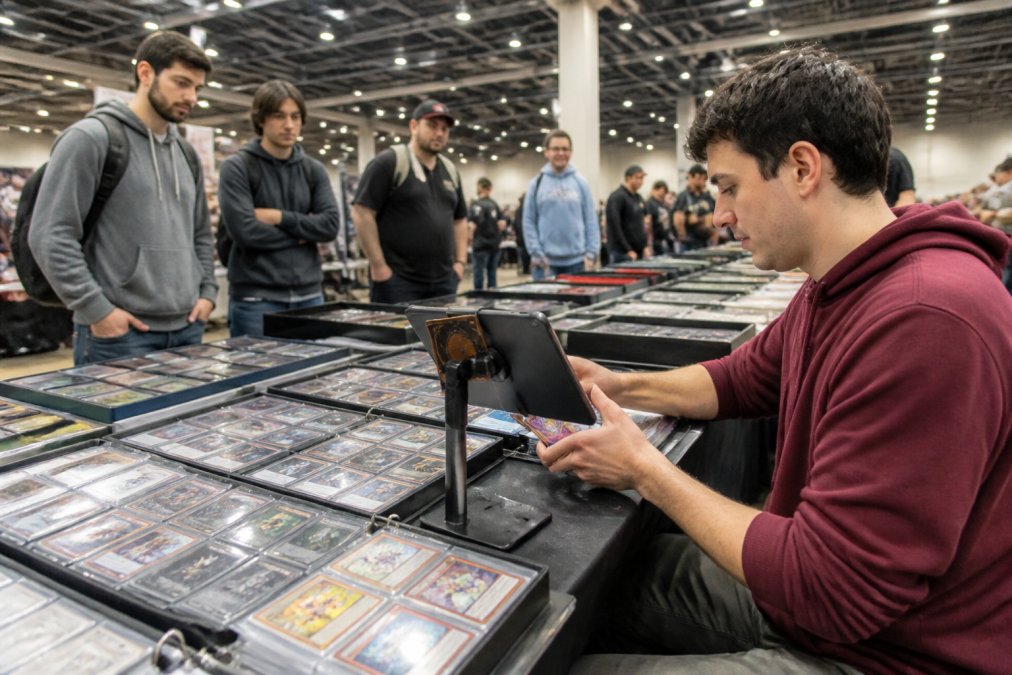
High-volume selling on an iPad depends on speed and multitasking. The tablet is an advantage, not a limitation, if you set it up right. Most guides stop at "get a stand and a scanner." The real gains come from matching hardware to workflow and using iPad multitasking to run two jobs at once.
Hardware Compatibility and Peripheral Support
Peripheral support matters more than most vendors realize. Practical pairings:
- Bluetooth barcode and 2D scanners. Most modern scanners pair as a keyboard, so they type the SKU or barcode straight into whatever field is focused in your app. That means you can scan a graded slab's barcode or a toploader label without touching the screen. Test pairing before the show floor, crowded venues are full of interference.
- Lightning vs. USB-C. Older iPads use Lightning; current models use USB-C. If you're buying a wired card reader or a powered hub, confirm the connector before you order. A USB-C hub with pass-through charging lets you run a card reader and keep the iPad topped up at the same time.
- Card readers for payment. A mobile card reader that pairs over Bluetooth keeps payment inside your selling flow instead of forcing a separate device. Confirm the reader's app supports the same iPadOS version you're running.
- Stands and mounts. A weighted stand or a clamp mount holds the iPad at eye level so you're not hunched over. For a booth, a mount that lets you rotate between portrait (scanning) and landscape (listing) saves constant repositioning.
- Lighting. A clip-on LED or a small ring light over your scan mat does more for image-recognition accuracy than almost any software setting. Consistent, diffuse light beats a single harsh overhead source.
Multitasking with Split View and Slide Over
iPadOS runs two apps side by side with Split View, or floats a third over them with Slide Over. For a dealer, that turns one screen into a full workstation:
- Split View for pricing and listing. Run your inventory app on one side and a marketplace listing page in a browser on the other. When you scan a card, you can check the live value and update the listing without switching apps or devices.
- Slide Over for messaging and payment. Float a messaging app or your payment reader over your inventory app so you can answer a buyer or take payment without leaving your scan screen.
- Drag and drop between apps. You can drag a card image or a price from one app into another in many cases, which speeds up creating a listing from a card you just scanned.
- Stage Manager on supported models. On iPads that support it, Stage Manager lets you keep several windows visible and switch between them quickly, useful if you're juggling inventory, a listing tool, and a messaging app at once.
Accessibility Settings That Pay Off at a Show
Accessibility settings aren't just for accommodation, they're speed tools in poor lighting and loud rooms:
- Larger text and bold text make prices readable at a glance when you're moving fast.
- Voice Control lets you trigger actions hands-free while you're handling cards.
- Guided Access locks the iPad into a single app so a customer or a helper can't wander out of your selling screen.
- Display zoom can make tap targets bigger for quick, accurate taps.
Free Features vs. Subscription Tiers: What You Actually Pay For
Free tiers usually cover the basics: limited inventory, single-user access, manual entry. Paid tiers add the features that matter at scale. But "free" and "paid" mean different things across apps, so the sticker price tells you almost nothing. Here's how to read a pricing page without surprises.
What Free Tiers Typically Include, and Where They Stop
A free tier is usually a trial by another name. Common limits:
- Inventory caps. A set number of cards or a set number of scans per month. Once you hit it, you either pay or stop adding inventory.
- Single user. One login, no team access. Fine for a solo hobby seller, a blocker for a booth with helpers.
- Manual entry only. No automated scanning or live pricing, you type values in yourself.
- No sync. Data lives on one device, so it can't update a marketplace listing when you sell at a show.
What Paid Tiers Actually Unlock
What you're really paying for is workflow efficiency. Paid features solve the problems that cost vendors the most money:
- Multi-user access with attribution. Everyone on the team logs in, and sales are tied to the person who made them. That's how you know who's closing and who's discounting too deep.
- Live pricing updates. Values refresh automatically instead of you checking each card by hand.
- Event-scoped inventory. You can ring up sales against a specific show, so your end-of-day totals actually match the event.
- Cross-platform sync. One source of truth across your booth and your online listings, which is what prevents double-selling.
- Automated scanning. Camera-based identification that adds cards to inventory in seconds.
How to Compare Tiers Without Getting Burned
When evaluating cost, don't compare sticker prices. Compare what each tier lets you do, and watch for these monetization patterns:
- Per-seat pricing. Some apps charge per user. A team of six can cost six times a single seat. Others bundle a set number of users into one subscription.
- Usage-based limits. Scanning or pricing may be metered. A plan that looks cheap can get expensive in a high-volume month.
- Feature gating. Live pricing or sync may be locked to the top tier even when you don't need the other features.
- Annual vs. monthly. Annual plans usually discount the monthly rate, but only make sense if you're selling year-round.
| Tier Type | Typical Access | Best For |
|---|---|---|
| Free | Single user, manual entry, inventory cap | Casual hobby sellers |
| Entry paid | Small inventory, basic sync | Weekend vendors |
| Team paid | Multi-user, live pricing | Show-focused dealers |
| Full platform | Event-scoped, attribution, automated scanning | High-volume operations |
Conclusion
The gap between a profitable show and a break-even one usually comes down to how well you track inventory, pricing, and sales in real time. Spreadsheets and memory can't keep up with a packed booth.
Frequently Asked Questions
What is the easiest way to track inventory at a card show?
The easiest method is an iPad app built for event-scoped inventory, where each show is its own data set. You scan or search a card, see its current market value, and log the sale in seconds. This replaces spreadsheets and manual price stickers. Look for apps with automated card scanning, real-time pricing, and offline reliability so a dropped Wi-Fi connection does not stop a transaction.
How can card dealers manage live pricing updates on an iPad?
Use an app that pulls market value from a pricing database and refreshes automatically. When a card spikes or drops mid-show, your listed price updates without you editing a spreadsheet.
Can multi-user support improve team collaboration at card shows?
Yes. When two to six people work the same booth, multi-user support with attribution shows who sold what. You get accurate sales data per person, faster checkout because anyone can process a transaction, and no double-selling because inventory updates across all devices. A single subscription covering up to six users is usually cheaper than buying separate seats.
How do I track profit and loss for my trading card business?
Track cost basis at the card level, not just revenue. A trading card inventory management software that records what you paid per card, then subtracts that from the sale price, gives you real profit and loss per event. Without cost basis, a $200 sales day can look successful while your actual margin is negative after booth fees and card cost.